
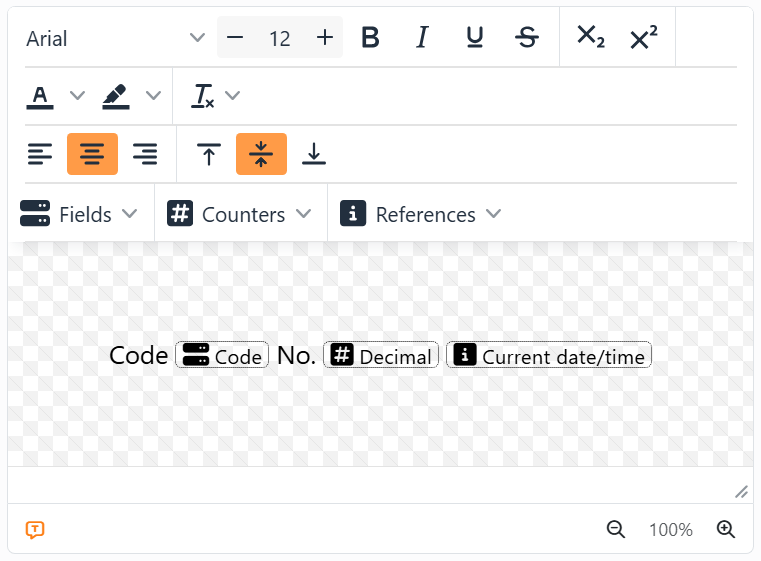
A placeholder is a spot in a text or a barcode that each label fills in by itself: a field of your data, a counter or a reference. In the editor it's a small box with a dotted border, holding an icon and a name; on the label, it's the value.
| Putting one in | |
| From the menus | Put the cursor where it goes, then pick from Fields, Counters or References, at the top of the text editor or of the barcode's Text to encode. With Show after adding a new item on - it is, to begin with - its settings open straight away. |
| By dragging a field | Drag a field from the Data source panel onto a label: as a new element, or at the start or end of one that's there. |
| By asking | Joy, the AI assistant, can write a text or a barcode with placeholders in it. |
A placeholder behaves like a single character. Type before and after it, select it with the text around it, delete it with Backspace or Delete, and - in a text - format it like the letters next to it: font, size, bold, italic, underline and colors all apply, and show on the label. Copied and pasted within Labeljoy it keeps all its settings - but a field the other label set's data doesn't have is left out. From another program, text arrives as plain text.
To change one, click it: its settings open, and whatever you change shows on the labels as you go - there's no OK, just Close. The first line switches it to another field, counter or reference without taking it out. To check one, rest the mouse on it: a card lists its settings.
| Settings most placeholders share | |
| Format | How a number or a date is written: pick one of the formats in the list, or type your own. See Number and date formats. |
| Number and date format | Which country's way of writing them - decimal comma or point, day or month first, the names of the months. Default format follows Default number and date format in the Settings, so changing that one changes every placeholder left on Default format. |
| Letter casing | Unchanged, all in lowercase, ALL IN UPPERCASE, Uppercase beginning of sentence or Uppercase Beginning Of Each Word. |
| Show after adding a new item | At the bottom of the settings: whether they open by themselves when you put a placeholder in. One switch for all of them. |
 Show placeholder names, at the bottom left of the editor, hides the names when the text gets
crowded: each placeholder is then just its icon over a dotted line. It's orange while the names show.
Show placeholder names, at the bottom left of the editor, hides the names when the text gets
crowded: each placeholder is then just its icon over a dotted line. It's orange while the names show.
In a page element there are no fields, and the references about one label - Column, Row, Label number, Set name - aren't offered. Control code is for barcodes only.




























