
Labeljoy starts as a demo, and the demo has no time limit. Everything works in it: design, print and export as much as you like. Two things set it apart: a DEMO watermark across everything you print, export or save as an image - the work area itself is never watermarked - and a limit on the number of times you can save. Buy a license, activate Labeljoy with its code, and both are gone.
A demo copy also doesn't check for updates, every page of its PDFs is a picture, and screen captures of Labeljoy's window come out blank.
| The licenses | |
| Flex | A monthly or yearly subscription. Care+ is included for as long as it runs. |
| Business | A perpetual license for workstations. It comes with a year of Care+, which you can then renew. |
| Enterprise | A perpetual license for Labeljoy on Windows Server, shared by your users. It comes with a year of Care+, which you can then renew. |
Prices, and how many computers or users each license covers, are on labeljoy.com: Buy on the toolbar, or Buy a license on the home screen, takes you there.
Activating Labeljoy. Your activation code comes with your license: 16 digits in four groups, like 1234-5678-9012-3456. Open Settings - or click I already have a code on the home screen, which takes you straight there - and in Activation type or paste the code, dashes included, then click Activate. Labeljoy checks the code online, so this computer needs to be connected to the internet. Once it's done, Status shows your license - Flex, Business or Enterprise - and the watermark is gone at once.
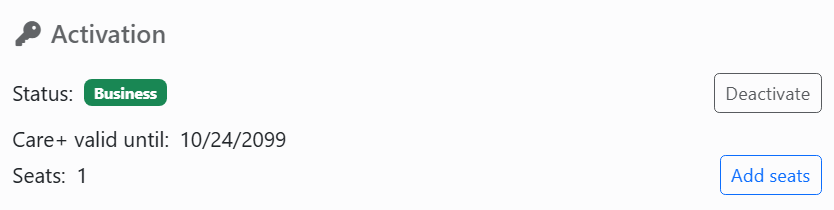
Below Status, Care+ valid until (Business and Enterprise) or Paid until (Flex) shows the date your Care+ or your subscription runs to - in red once it has passed - and Seats how many computers or users your license covers. Add seats opens labeljoy.com, where you can buy more.
Moving to another computer. In Settings, Activation, click Deactivate and confirm: this computer goes back to the demo and frees the code. Then activate Labeljoy on the new computer with the same code.
Joy, the AI assistant, can't activate or deactivate Labeljoy, and can't see your activation code.
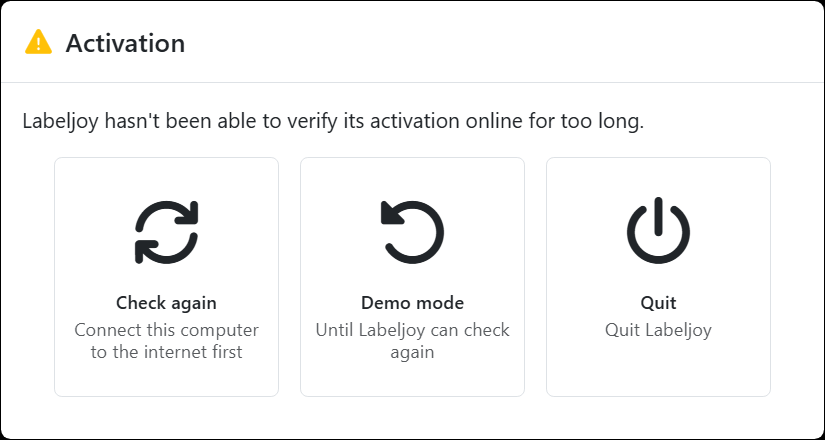
Staying activated. Each time it starts, an activated Labeljoy checks its activation online. Without the internet it carries on as usual for a limited time; after that it asks what to do:
| When the activation can't be verified | |
| Check again | Connect the computer to the internet first, then click this. Once Labeljoy has checked, it says Labeljoy has verified its activation. and goes on as usual. |
| Demo mode | Labeljoy works as a demo until you close it. Your activation isn't lost: the next time Labeljoy starts, it checks again. |
| Quit | Closes Labeljoy. |
Care+ is what keeps Labeljoy current: updates, support, use on virtual machines and in remote sessions, and cloud services. A Flex license always has it. With a Business or Enterprise license it runs for a year, then you renew it. A week before it runs out, Renew appears on the toolbar and Renew Care+ on the home screen; both take you to the renewal page on labeljoy.com. After renewing, restart Labeljoy so it picks up the new date. Once Care+ has expired, a Business or Enterprise license still works, with no watermark - only what Care+ brings stops, starting with updates.
| Messages | |
| This activation code isn't valid: check it and type it again. | A digit is probably wrong. The code is on your purchase confirmation. |
| Invalid activation code length. | The code needs all 16 digits, with the dashes between the groups of four. |
| Invalid character detected. | Only digits go between the dashes. |
| A Business activation code can't be used on Windows Server, which needs an Enterprise license. | Activate Labeljoy on Windows Server with an Enterprise code. |
| This activation code has been disabled, so Labeljoy is back in demo mode. | At start-up, the activation server said the code is no longer in use. Contact support if you don't know why. |
| The activation server doesn't recognize this activation code, so Labeljoy is back in demo mode. | Activate Labeljoy again with your code, and contact support if it's refused. |
| This copy of Labeljoy is not activated. | There's nothing to deactivate: this copy is already a demo. |




























