
LabeljoyNew version
A border is a line round the edge of an element, or of each label. The same control sets the lines of a Line element, the rules of a Grid and the outline of a Text, so it's described once, here.
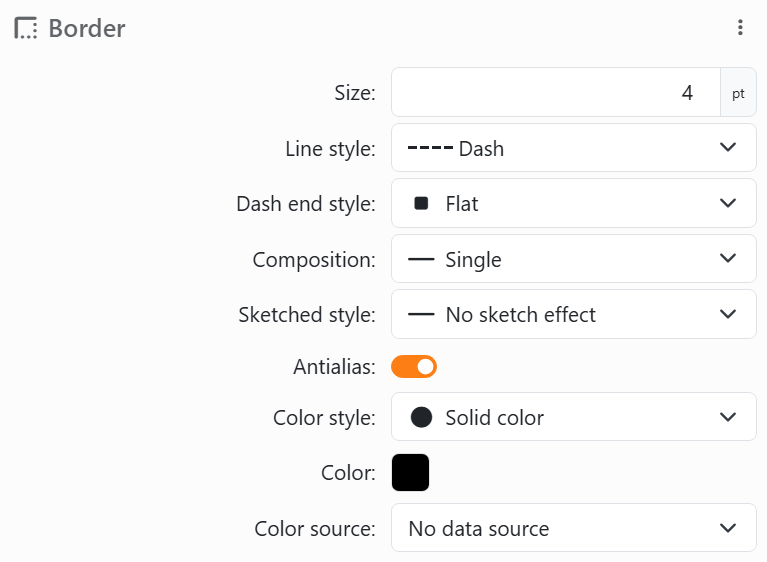
| The border control | |
| Size | How thick, in points. At 0 there's no border, and the rest is hidden. |
| Line style | Solid line, or one of the dashed and dotted patterns: Dash, Dot, Dash Dot, Long Dash, Tiny Dot and more. |
| Dash end style | For a dashed or dotted style: whether each dash has square (Flat) or Round ends. |
| Composition | One line (Single) or several side by side: Double thin, Double thick, Triple, Triple Inverted, Quadruple, Quadruple mixed. |
| Sketched style | Subtle, Medium or Heavy make the line wobble, as if drawn by hand. No sketch effect keeps it straight. |
| Antialias | Smooths the line's edges. It starts on. |
| Color style, Color, Color source | The color control: a color or a fade, or a color from your data. A border has no Transparent: set Size to 0 instead. |
Where it is. An element's Border is in its Properties; it follows the element's shape. A label's is in the Label set panel and follows the shape of the labels. Either way it's drawn inside the edge, so a thicker border doesn't make anything bigger.
| What the other uses add or leave out | |
| Line | Rotation, Begin style and End style (Round, Arrow, Diamond and more), and Padding. Dash end style is always there. |
| Text outline | Outline style: drawn Behind the letters, in Front of them, or Empty - the outline alone, the letters hollow. No Antialias or Composition. |
| Grid | The size is called Line size, and the color is set apart. |
The ⋮ menu next to Border has Copy border, Copy color, Paste and Reset all. A page element's border can't take its color from your data.
See also




























