
A document can ask for a password before it opens, before it can be changed, or before it's printed or exported - or any mix of the three. You set it up in the Password section at the bottom of the Save panel.
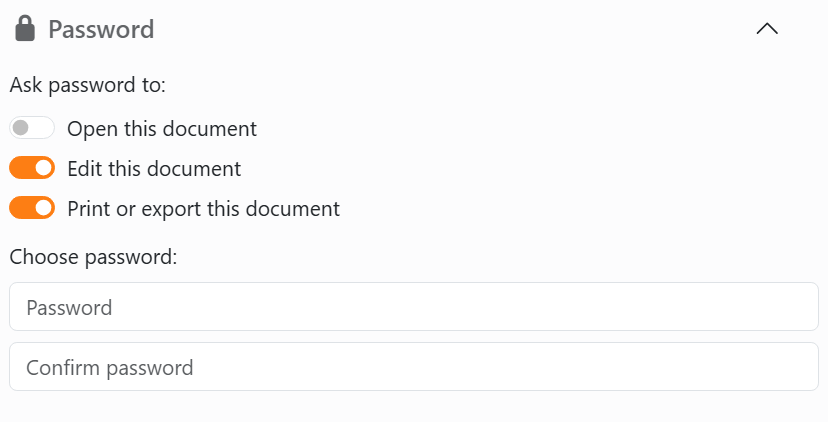
To protect a document:
- Open the Save panel and click Password to open the section.
- Switch on what the password should protect. You can switch on more than one.
- Type the password in both boxes. It needs at least 8 characters, and capitals count: Labels2026 and labels2026 are two different passwords.
- Click Save or Save as in the panel.
The switches only count when you save from this panel. Ctrl+S and the save icon on the document tab save the document as it was, without them.
There's one password for everything you switched on. Once the document is saved, the section shows Remove password instead of the switches.
| What each switch does | |
| Open this document | Labeljoy asks for the password before it opens the document. Got it wrong? You can try again as many times as you like. Cancel leaves the document closed. |
| Edit this document | The document opens, but you can't change it. You can still look at it, print it and export it. See When a document is protected for what's dimmed. |
| Print or export this document | Labeljoy asks for the password every time you print or export the document, and when you use Copy as image or Save as image in the right-click menu. |
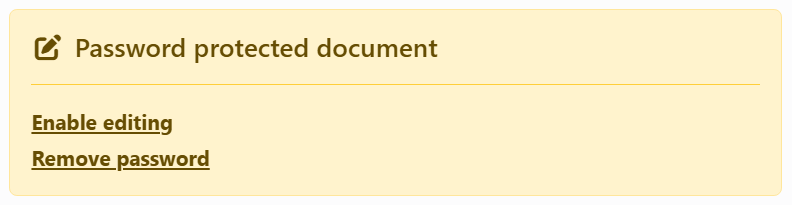
Changing a document protected against editing. The top of its Document panel says so, and gives you two ways round it:
| On the warning | |
| Enable editing | Asks for the password, then lets you change the document until you close it. The protection stays: save it and it's saved protected, and the next time it opens it's locked again. |
| Remove password | Asks for the password, then takes off all the protection - open, edit, and print or export. Save the document to keep it that way. |
Remove password is in the Save panel too, in place of the switches, for any kind of protection. Removing it is a change like any other: Undo puts it back.
Keep your passwords somewhere safe: Labeljoy has no way to show you one you've forgotten. Joy, the AI assistant, never asks for a password, and can't set or remove one.




























