
Email support puts you in touch with the Labeljoy technical support team. Click Email support in the Help panel: Labeljoy opens a dialog where you write your request and choose what goes with it.
| In the dialog | |
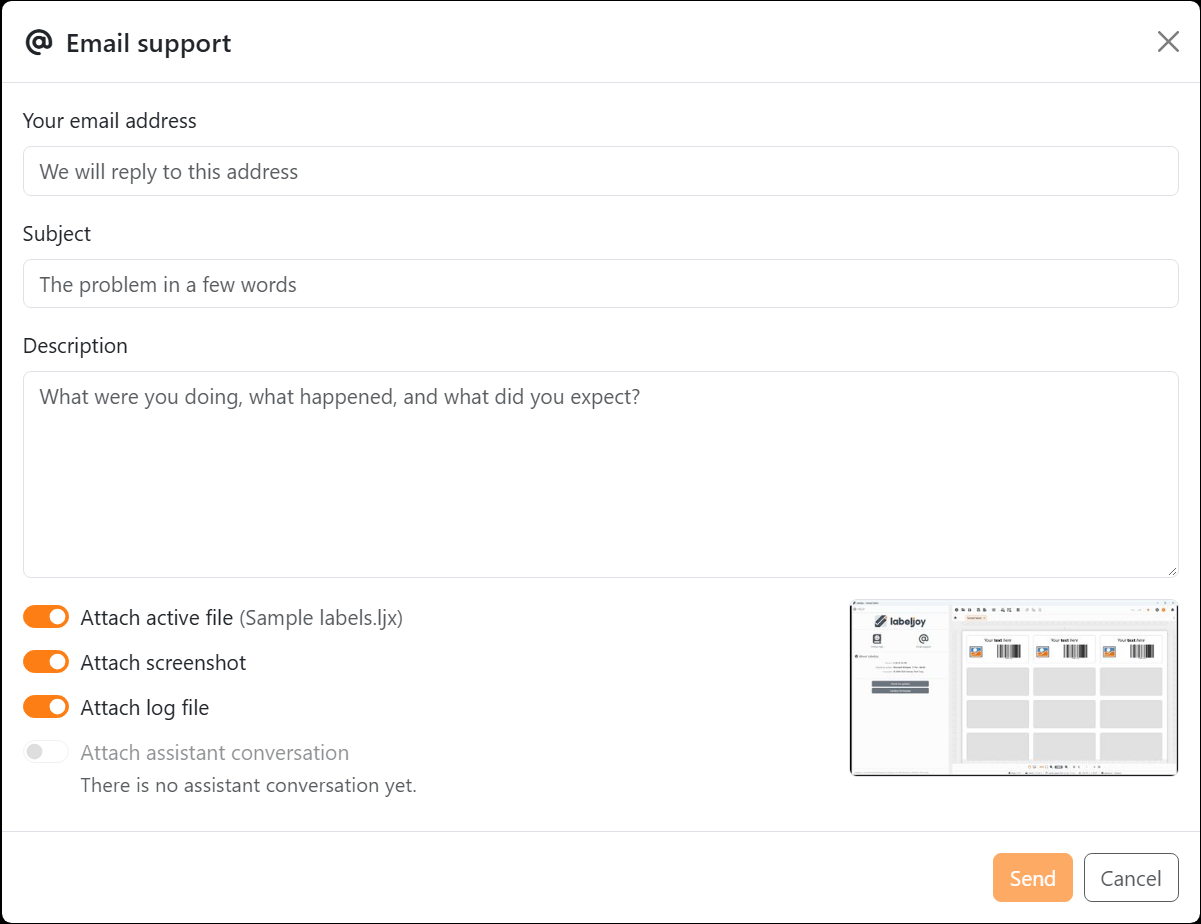
| Your email address | Where the team replies to you. |
| Subject | The problem in a few words. |
| Description | What you were doing, what happened, and what you expected. Send works once all three are filled in. |
| Attach active file | The document you're working on, named beside the switch, so the team can open it. |
| Attach screenshot | A picture of the Labeljoy window, with Joy's panel if it's open - the small picture in the dialog. Only Labeljoy's own windows are in it: anything else on your screen isn't. |
| Attach log file | A record of what the program did and of any errors it ran into. |
| Attach assistant conversation | Your conversation with Joy, if you've had one - including what Joy read from your document to answer you. |
| Send | Sends your request, with whatever is switched on. |
Every switch starts on: turn off anything you'd rather not send. A switch that can't apply is off and greyed out, with the reason under it - for example when no document is open, the document is new and unchanged, or it's protected by a password.
The screenshot and the file show whatever is in your document, including data from a connected data source. If your labels show something you'd rather not share, turn those two switches off.
Joy can open the dialog for you too, if you ask it to. Nothing is sent until you click Send.
The log file is kept in C:\ProgramData\Delivery Tech Corp\Labeljoy X\ljx_log.txt.




























