
Filter and sort prints the labels for only some of your rows - one customer's
orders, the products that are in stock - and in the order you want, without touching your data. Open it
with Filter and sort in the Data source panel.  Help, at its
top right, opens this page.
Help, at its
top right, opens this page.
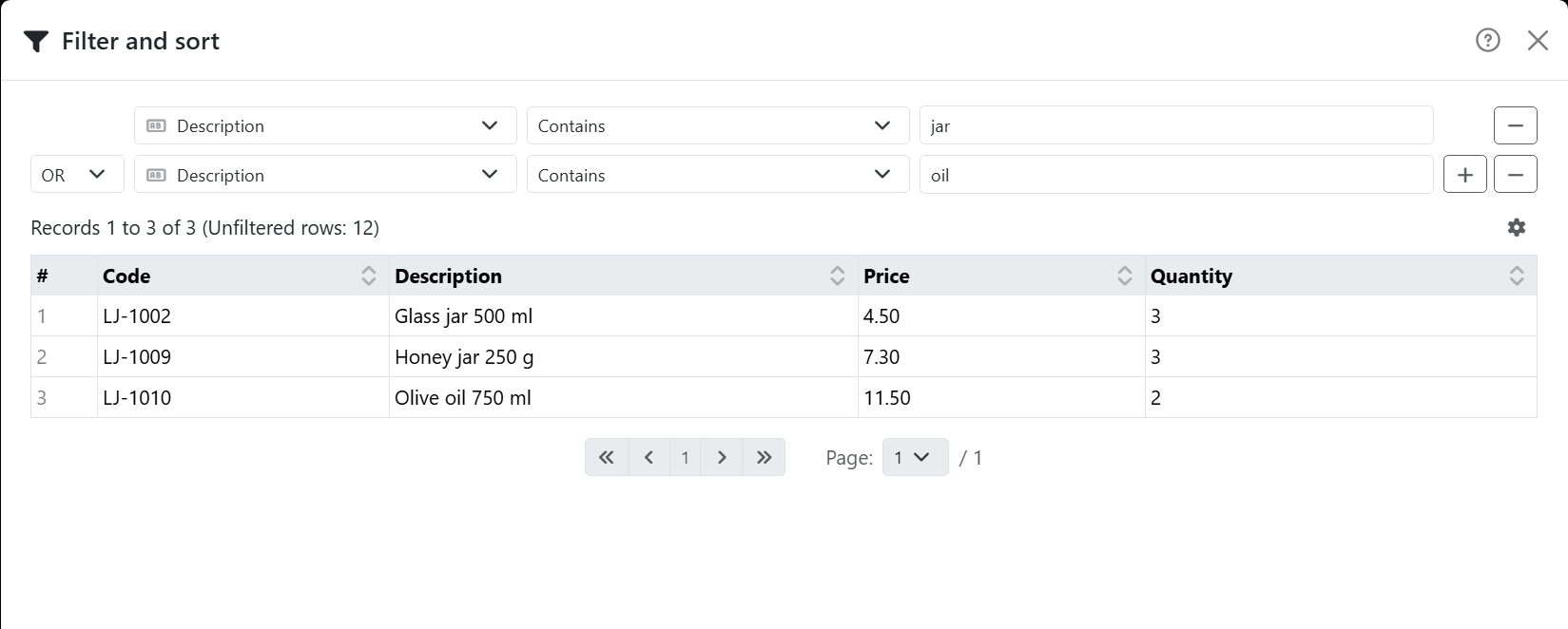
Each line at the top is a condition: a field, how to compare it, and a value. The table underneath shows the records that pass, as you change them.
| A condition | |
| Field | Pick one under Select field.... Fields of pictures or other raw data are dimmed. |
| How to compare | Depends on the field. Text: Equal to, Starts with, Ends with, Contains, Not equal to. Numbers: Equal to, Greater than, Greater than or equal to, Less than, Less than or equal to, Not equal to. Dates and times: Is after, Is before and the like. Yes/no fields: Equal to or Not equal to. |
| Value | Typed, or picked: a date from the calendar, True/Yes/On/Non zero or False/No/Off/Zero for a yes/no field. A time span is typed as hours, minutes and seconds, as in 01:30:00. Text is compared without minding capitals. |
| AND, OR | From the second line on: how the condition joins the one above. With AND a record has to pass both; with OR, either. |
| + and − | Add a condition after this one, or remove this one. |
The conditions are read in order, from the top: A OR B AND C means (A or B), and C. An empty cell never passes a condition - not even Not equal to.
To sort, click the arrows next to a column's name in the table: once for ascending, again for descending, a third time to stop sorting by it. Sorting by another column replaces it - unless Multiple sorting is on, and then each column you click sorts within the one before.
| The gear | |
| Adapt cells to content | Widens the columns to fit instead of wrapping. |
| Multiple sorting | Sort by more than one column. Switching it off removes the sort. |
| Clear filter and sort | Starts over: no conditions and no sort. |
| Records per page | 10, 25, 50 or 100 at a time. |
OK applies it all; Cancel, the X or the Esc key leave things as they were. When no record passes, the table says No matching records. and there's nothing to confirm. You can undo a filter.
| What it changes | |
| The labels | One for each record that passes, in the order you chose - the page count follows. |
| The status bar |  One icon while a label set is filtered, one while it's sorted. Click them
to come back here. One icon while a label set is filtered, one while it's sorted. Click them
to come back here. |
| Updating the data | The filter and the sort stay. A condition on a field the data no longer has is dropped. |
| Connecting again | Starts over, without a filter or a sort. |
In a text or CSV file, every value is text - numbers too - so they're compared and sorted as text: 10 comes before 9. A spreadsheet or a database keeps its numbers as numbers.




























