
LabeljoyNew version
A field placeholder prints a column of your data: on every label, the value of that label's own row. Put one in from the Fields menu of the text editor or of a barcode, or drag it from the Data source panel. The menu lists the label set's fields, each with an icon for the kind of values it holds; with no data connected yet, it offers Connect data source instead.
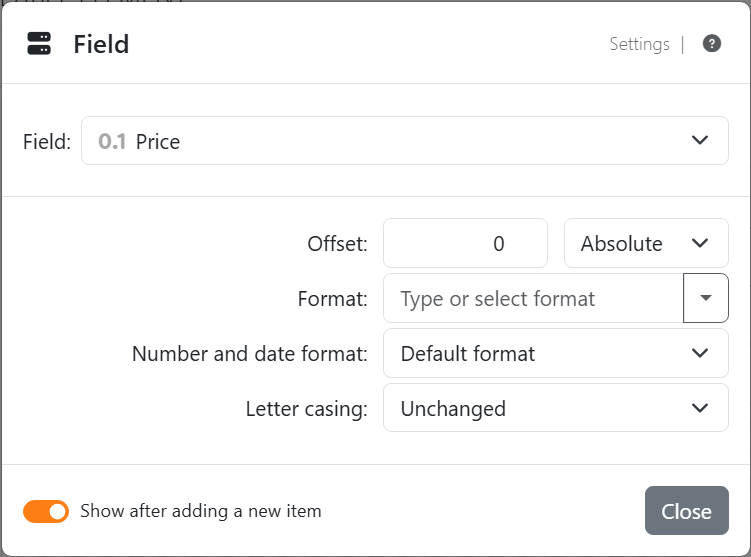
| The Field settings | |
| Field | Which column. Pick another to switch the placeholder to it. |
| Offset | For numbers: a value to add - negative to take away - as an amount (Absolute) or as a Percent of the value, so a price can print 10% higher. For dates and times: a number of Years, Months, Days, Hours, Minutes and Seconds to add or take away, for a best-before date 30 days after the production date. |
| Format | How the value is written. The list depends on the field: for numbers, Numeric formats, Currency formats and Percentage formats; for dates and times, Date and time formats; for yes/no fields, Yes/No, True/False or On/Off. Type your own, or see Number and date formats. Text fields have none. |
| Number and date format | Which country's way of writing it; Default format follows the Settings. See Placeholders. |
| Letter casing | As typed, or changed to lower case, upper case, or capitals at the start of the sentence or of each word. |
| What prints | |
| An empty cell | Nothing, and the text around it stays. Turn on Compact rows in the Text section and a line left empty is left out. |
| A duration | A time span - from a database, say - prints as one: 01:30:00 for an hour and a half. The offsets lengthen or shorten it. |
| A picture | A column of pictures, as some databases store them, can't go in a text; use it in an Image instead. |
| Hexadecimal or Binary | For a number with decimals, the nearest whole number is written in hexadecimal or binary. |
| Emoji | Left out of a text, as they are when you type them; a barcode keeps them. |
| In a barcode | The value is encoded exactly as it is. A value the symbology can't take - letters in an EAN, say - shows an error on the work area instead of that label's barcode. |
A field belongs to the data of its own label set. When you update the data and a column is gone, or remove the data source, the fields that used it are taken out; the text around them stays.




























