
A reference placeholder prints something Labeljoy knows: the page, the date, the file name, where the label sits on the sheet. Put one in from the References menu of the text editor or of a barcode.
| The references | |
| Current page, Total pages | This page's number, and how many pages there are. |
| First label on page, Last label on page, Total labels | Label numbers, counted across the whole document: on the second sheet of 24, the first label is 25. |
| File path and title, File title | Where the document is saved, with its name - or its name alone, without the extension. Both are empty until the document has been saved. |
| Layout brand, Layout description, Layout model | What the Layout panel says about the labels you print on. |
| Current date/time | The date and time, moved on or back by an Offset if you like - see below. |
| Computer name, User name | The name of the computer, and of the account you're signed in with. |
| Column, Row | Where the label sits on the sheet, counted from the top left. |
| Label number | The label's number in the document, across all its label sets. |
| Set name | The name of the label's label set. |
| Modulo-10 checksum | A check digit for the digits right before it, worked out the way EAN and GS1 numbers are: put it after a field or a counter and each label gets its own. |
| Fill and print | A value you type each time you print - see below. |
| Control code | In barcodes only: one of the invisible characters some barcodes use to separate their data - see below. |
Click a reference to see its settings. Reference switches it to another one; Format, Number and date format and Letter casing work as they do for every placeholder. The rest depends on the reference:
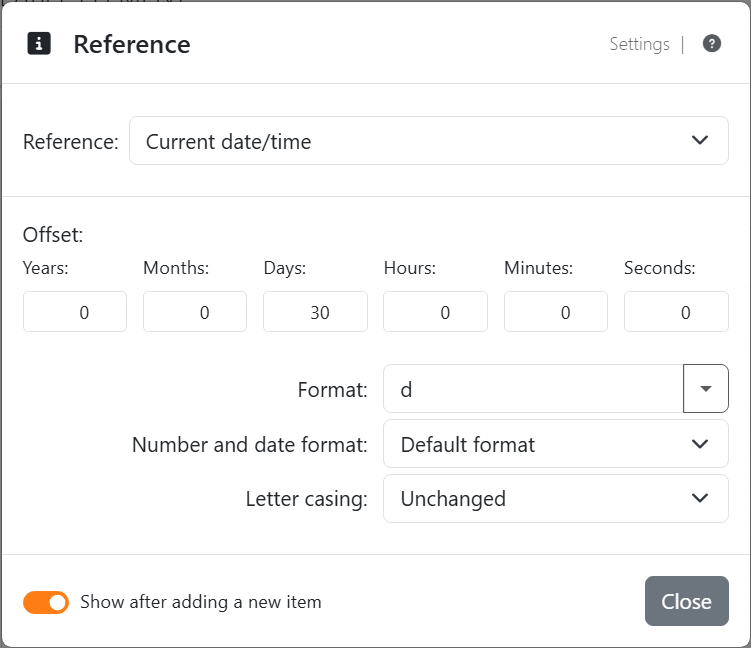
| Current date/time | |
| Offset | Years, Months, Days, Hours, Minutes and Seconds to add - or, negative, to take away. 30 days for a best-before date. |
| Format | The date alone, the time alone or both, short or long, as your Number and date format writes them; or Custom date, Custom time and Custom date/time, as day/month/year and a 24-hour clock - with the separators of your Number and date format, so 30.09.2026 in German. See Number and date formats. |
| When | On the work area, the time it's drawn. In a print or an export, the time the job starts - the same on every page of it. |
| Fill and print | |
| Title | The question you'll be asked, such as Lot number. It can't be empty. |
| Description | A line of help under it, if you like. |
| Allow empty | Whether you may leave the answer blank. Off, the answer is (Mandatory). |
| Fill once only | With it on, Fill and print placeholders that share this title are asked once, and the one answer goes to all of them. |
Each time you print or export - or copy or save a picture of a label - Labeljoy asks, one question
per step, with Back and Next between them; Cancel stops the job. The answer goes on every label of that job. On the work
area the placeholder shows its title in braces, as {Lot number}. The answer isn't kept: next time, you're
asked again. Printing from the command line asks too.  Help, at the top right
of that dialog, opens this page.
Help, at the top right
of that dialog, opens this page.
| Control code | |
| Code | Which character, from {NUL} to {US}, each with its name: {HT} Horizontal tab (the first one you get), {CR} Carriage return, {GS} Group separator, {RS} Record separator and the rest. The barcode's specification says which it wants. |
In a page element, Column, Row, Label number and Set name aren't offered: a page element belongs to the page, not to a label.




























