
LabeljoyNew version
The Settings panel opens from Settings on the toolbar. What you set there is Labeljoy's, not a document's: it applies to every document, and it's saved as soon as you change it.
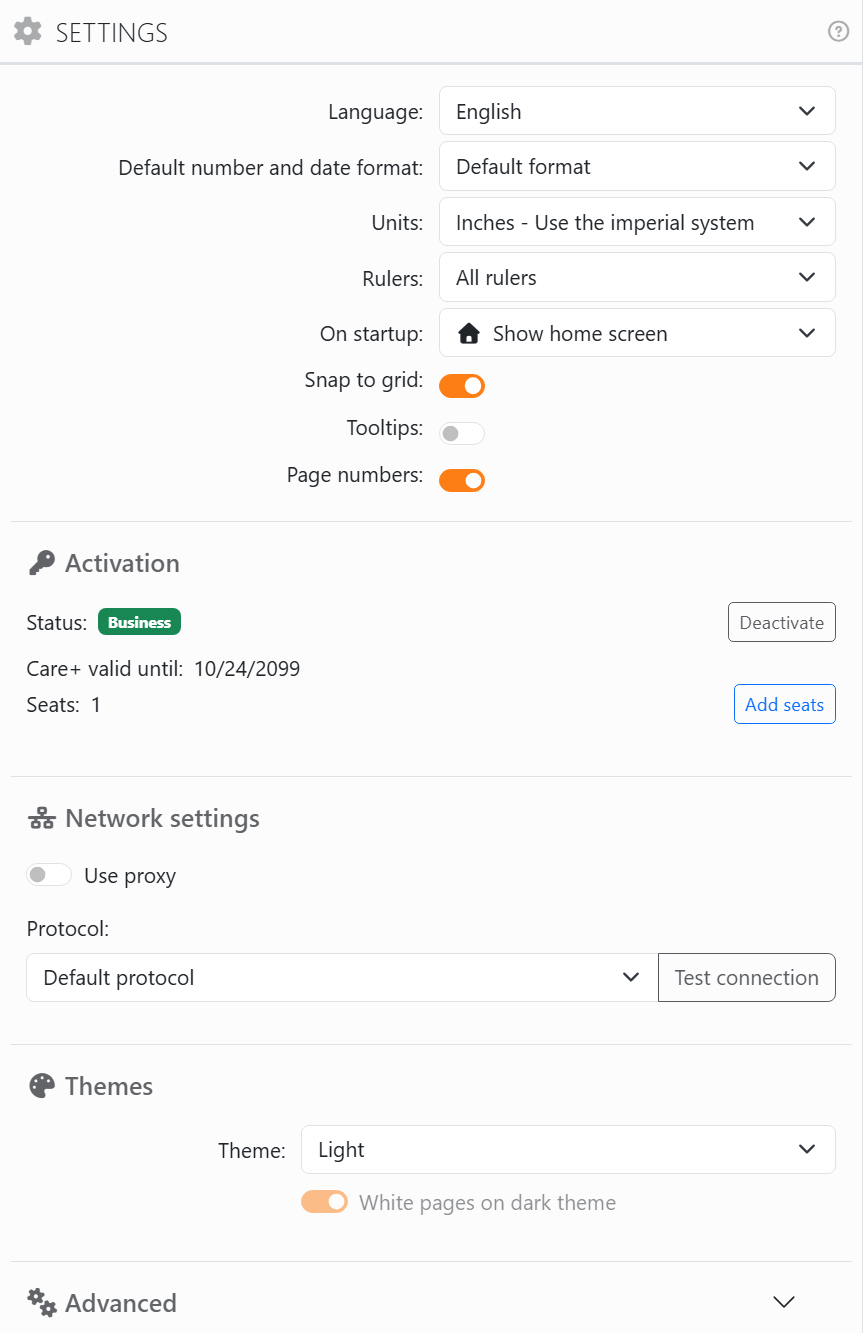
| Settings | |
| Language | The language of the whole program, each listed in itself. It changes at once, no restart. |
| Default number and date format | Which country's way of writing numbers and dates the placeholders use when theirs is Default format. Default format here is your computer's own. See Number and date formats. |
| Units | Inches, centimeters, or Both, where each document keeps its own - see Measurements and units. |
| Rulers | Which sides of the work area have rulers: All rulers, Vertical only, Horizontal only, Left top, Right top, or No rulers. |
| On startup | Show home screen, the home screen; Restore last session, the documents that were open when you closed Labeljoy; or Load default layout, a new document from your default template. Open Labeljoy by double-clicking a document, and that document opens instead. |
| Snap to grid | Whether elements snap to the grid while you move or resize them with the mouse - see Moving, resizing and rotating. |
| Tooltips | Whether an element's or a label's name pops up when you rest the mouse on it. It starts off. |
| Page numbers | Whether the number of each page, or label, is shown above it on the work area. It's never printed. |
Activation says whether this copy is a Demo or which license it has - Flex, Business or Enterprise - and is where you type an activation code or deactivate this computer - see Demo, activation and Care+.
| Network settings | |
| Use proxy | Only if your network reaches the internet through a proxy - your IT department will know. Then URL, Port, and, if it asks for them, User and Password. A saved password shows as dots: type over it to change it, or clear it. |
| Method | How the proxy checks who you are: Default method, NTLM, Digest, Kerberos or Negotiate. |
| Protocol | The secure protocol for connections: Default protocol lets the system choose, which is right almost always; or TLS 1.0 to TLS 1.3. |
| Test connection | Tries the settings, and says whether the connection worked. |
| Themes and Advanced | |
| Theme | System follows your computer's light or dark mode; or always Light, or always Dark. |
| White pages on dark theme | Only with the dark theme: keeps the pages white on screen, as they'll print. Off, the grays are inverted on screen - black text shows white - and a note under the switch says so. Printing and exporting aren't affected either way. It starts on. |
| Advanced | Closed at first: click it for the three below. |
| Hardware acceleration | Draws the work area with the graphics card. It starts off. |
| Restore hidden messages | Brings back every message you hid with Hide this message. |
| Open log folder | The folder of Labeljoy's log files - useful when support asks for them. |




























