
LabeljoyNew version
Every color in Labeljoy - a background, a border, a text, a barcode, a line - is set with the same control: a style, one or two colors, and, if you like, a column of your data to take it from.
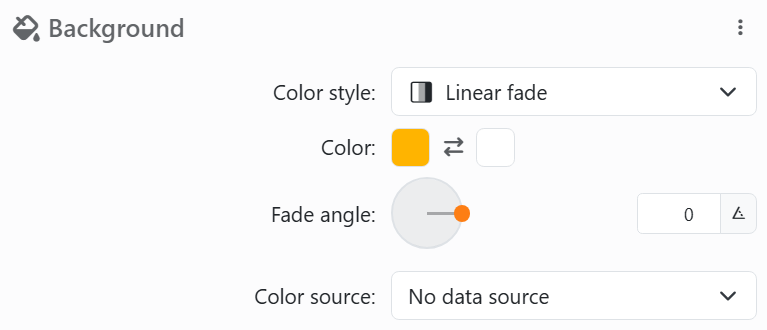
| The color control | |
| Color style | Transparent (nothing), Solid color (one color), Linear fade (from one color to the other across the element) or Radial fade (from the center out). Pens, borders and lines have no Transparent. |
| Color | One swatch, or two for a fade, with Invert colors between them to swap them. Click a swatch for the picker. |
| Fade angle | For a linear fade: the direction it runs, on a dial. At 0° the first color is on the left and the second on the right. |
| Radial percentage | For a radial fade: how far from the center the second color is reached - at 100%, the left and right edges. Double-click the slider for 100%. |
| Color source | A column of your data, so each label gets its own color - see below. |
The picker has a color area, a hue slider and an opacity slider, the values as RGB, HEX or HSL (the button beside them switches), and 24 ready colors plus transparent.
| What a Color source column can hold | |
| #RRGGBB | An HTML color: #FF0000 is red. Also #RGB, and #RRGGBBAA with the opacity last, as the picker writes it. |
| A color name | Red, Navy, LightBlue and the other standard names. |
| r,g,b,a | Red, green, blue and opacity, 0 to 255 each: 255,0,0,255. |
| A fade | Two colors and an angle, as r,g,b,a,r,g,b,a,angle with the angle clockwise; or a radial one as r,g,b,a,r,g,b,a,percent,1. |
| LJ01 to LJ40 | The palette of Labeljoy 6. |
| Anything else | An empty cell, or a value Labeljoy can't read, gives the color set in the control. |
A single color from your data replaces both colors of a fade. Colors are screen colors (RGB): what prints depends on the printer. Grayscale in the Print panel prints them in grays.




























