
Joy is Labeljoy's AI assistant. Ask it things in plain words - "how do I print only the first ten labels?" - or tell it what you want done - "put the barcode in the middle of the label" - and it answers, or makes the change for you.
To open it, click Assistant in the toolbar, or press Ctrl+Shift+A. You can also type a question in the field at the top of the home screen: Joy opens with it and answers.
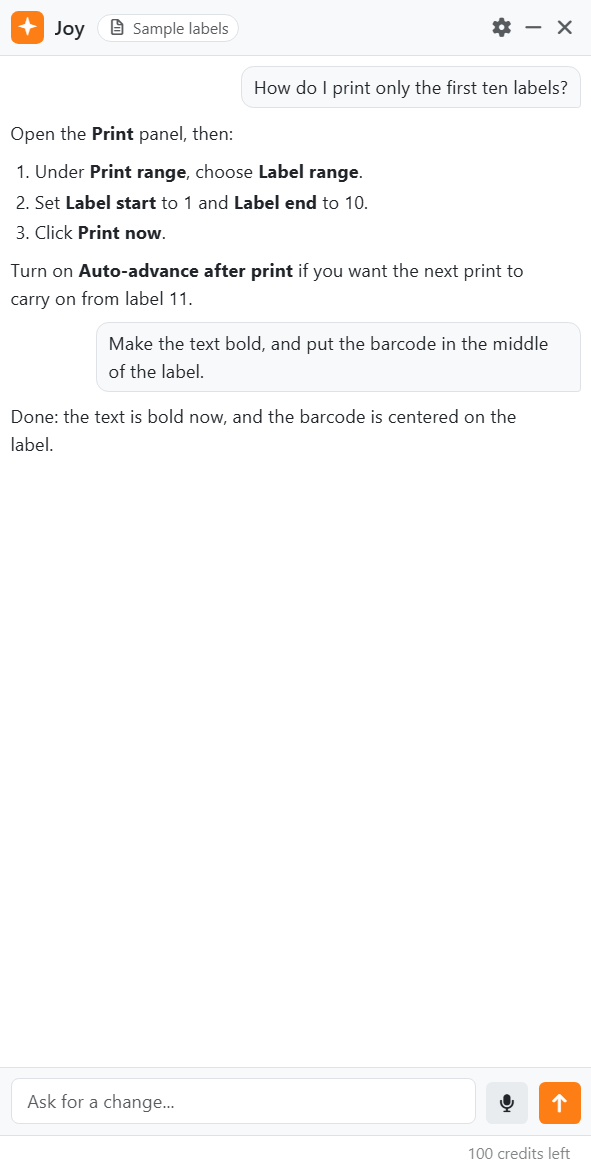
| The panel | |
| At the top | Joy's name, and the name of the document. Then the gear, Options (see below), Collapse and Hide the assistant. |
| The conversation | Your requests on the right, Joy's answers on the left. Links in an answer open in your web browser. |
| The box | Type here and press Enter, or click Send. Shift+Enter starts a new line. The microphone next to it is for speaking to Joy. |
| credits left | At the bottom right: how many requests you have left. Each request uses one, however many steps Joy takes for it - a picture Joy draws included. See Credits. |
The panel runs down the right side of the work area, and the work area makes room for it, so it never covers your labels. Drag its left edge to make it wider; Labeljoy remembers the width. In a window too narrow for both, the panel floats over the work area instead. Collapse shrinks it to a round button in the bottom right corner - click that to open it again, conversation and all. Hide the assistant takes it away completely, until you click Assistant again.
Joy answers in the language Labeljoy is in - even if you write to it in another one. To change it, change the language in the Settings. Joy needs an internet connection; what it sends is in Privacy.
| What Joy can do | |
| Answer questions | About Labeljoy, and about the document you've got open: what is where, why a label looks the way it does, how to do something. For questions about Labeljoy, Joy looks in this guide - the one that came with your version. |
| Change your labels | Texts, barcodes - QR codes for a contact, a Wi-Fi network or an event included - pictures, shapes, colors, sizes and positions. It can add and delete elements and label sets. |
| Set things up | Find your labels in the layout library and apply them, start a new document or one from a template, open and save documents, and connect a data source from a file, then filter, sort and update it. |
| Find a clipart | Look through the cliparts for what you describe - an owl, a flag, a road sign - and put it on your label. |
| Draw a picture | From a description - a logo-like icon, a background, an illustration. One per request, and never with words in it. |
| Print and export | It always asks before it prints, on a card with Print and Cancel. An export never replaces a file: it gets a new name instead. |
| Change some settings | Such as the units, the rulers, snap to grid and the language. |
Joy doesn't see the rows of your data - only the names of the fields and how many rows there are. It can't change a document that's protected against editing, and it never asks for a password. It can't connect a professional database: use the Data connection wizard for that. And it can't help with your license or activation.
Undoing what Joy did. Everything Joy changes for one request is a single step, called AI assistant: one Undo takes it all back, and so does Ctrl+Z, even while you're in Joy's panel. You can also ask Joy to undo it. The first time Joy changes your document, a tip under its answer reminds you how.
While Joy works, the box says Working - press stop to interrupt. You can keep using Labeljoy while Joy is only writing an answer; while it's changing your document, the rest of the window waits until it's done. Stop, where Send was, interrupts it - or press Esc. Whatever it had already changed stays, and can be undone.
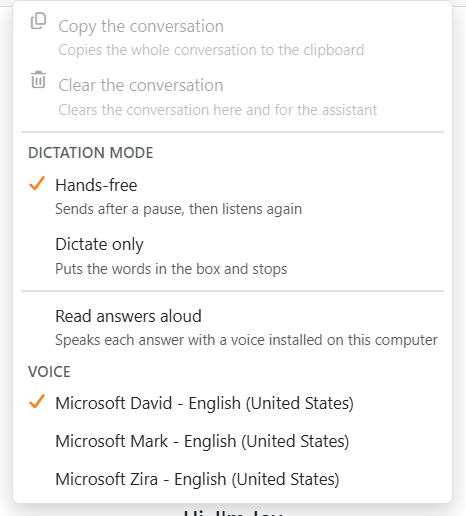
| The gear and the conversation | |
| Copy the conversation | Puts the whole conversation on the clipboard. To copy just part of it, select it with the mouse and press Ctrl+C, or right-click it and choose Copy. |
| Clear the conversation | Starts again: the conversation goes, from the panel and from what Joy remembers. You can also right-click the conversation for it. |
| × on a request | Shows up when the mouse is over it, as Remove this exchange: it takes that request and its answer away, and Joy forgets them too. |
| The rest | Dictation and reading answers aloud: see Speaking to the assistant. |
The conversation lasts until you clear it or close Labeljoy. Now and then Joy asks How is the assistant doing? - give it a mark from 0 to 5, or click Not now.
| When something goes wrong | |
| The assistant could not be reached. | Check your internet connection and try again. |
| The assistant service is unavailable at the moment. | The problem is on our side. Try again a little later. |
| Too many requests just now. | Wait a moment, then send it again. |
| There are no assistant credits left on this license. | A notice above the box, with Buy credits: see Credits. |
| The assistant is not available for this license. | The assistant service didn't accept this license. Restart Labeljoy and try again; if it goes on, contact support. |
| The assistant cannot change the document while a dialog is open. | Close the dialog first. |




























