An AI assistant of your own - Claude, ChatGPT, Copilot, Cursor - can work in Labeljoy too. External AI and its settings are available only with an Enterprise license with an active Care+ subscription. It creates and changes labels, connects data, prints and exports, with the tools Joy, the AI assistant, uses - all but drawing pictures with AI. You ask in your assistant's own window, and the changes show up in Labeljoy as it works.
It connects through MCP, the Model Context Protocol, which most AI assistants support. All it takes is a small program, the Labeljoy MCP server, and one setting in Labeljoy.
On any other license, the External AI settings aren't shown at all - see Demo, activation and Care+. External AI doesn't use Joy's credits: your AI assistant runs on your own account with its provider.
Switch it on. In Settings, open External AI - available only with an Enterprise license with an active Care+ subscription - and turn on Allow external AI. Then pick the one that fits:
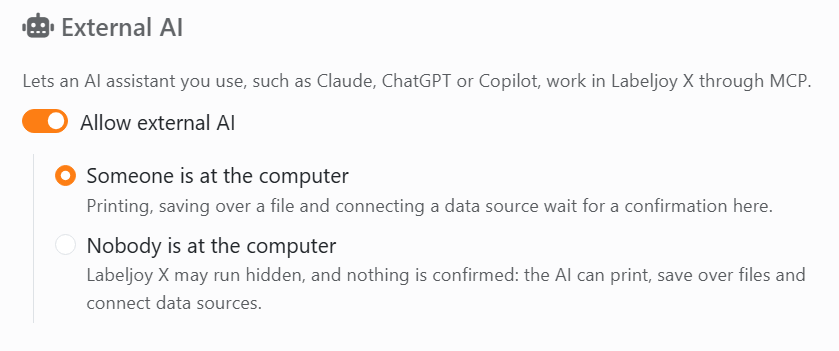
| External AI | |
| Allow external AI | Lets an AI assistant you use work in Labeljoy. Off, none can. Turning it on picks Someone is at the computer. |
| Someone is at the computer | You're working with the AI. Before it prints, saves over a file, deletes one of your templates, or reads a data file or the clipboard, Labeljoy asks you first, in its own window. |
| Nobody is at the computer | For a server or a job that runs on its own. Labeljoy may run hidden, and it asks nothing: the AI can print, save over files and connect data sources. |
The MCP server comes with Labeljoy. The setup installs it beside Labeljoy, as LabeljoyX.Mcp.exe in C:\Program Files\Delivery Tech Corp\Labeljoy, and every update keeps it up to date. Your AI assistant has to run on the same computer, as the same Windows user.
Add it to your AI assistant. Every assistant that supports MCP has a list of MCP servers - some call them tools or connectors, or local servers. Add one, and give it the full path of LabeljoyX.Mcp.exe as its command, with nothing after it. In Claude for Windows, for example:
- Open Settings, then Developer, then Edit Config.
- In the file that opens, claude_desktop_config.json, add:
{
  "mcpServers": {
    "labeljoy-x": {
      "command": "C:\\Program Files\\Delivery Tech Corp\\Labeljoy\\LabeljoyX.Mcp.exe"
    }
  }
}
Every backslash in the path is written twice. - Quit Claude completely, and open it again.
Now ask your assistant to do something in Labeljoy - "make a 4 × 6 inch shipping label with a Code 128 barcode", say. If Labeljoy isn't running, it's started for you.
While an AI is working. The status bar shows which AI is connected, from its first action until you close it. Its icon pulses while it's doing something.

- Everything it does is written down. Click the AI's name in the status bar to open today's activity log: a text file, one line for every action - what it did, to which document, and what Labeljoy refused. There's one file a day, kept for 90 days, in %APPDATA%\Delivery Tech Corp\Labeljoy X\External AI.
- One request, one Undo. Everything the AI changes in one go - one action after another, a few seconds apart - is a single change called External AI, so one Undo takes it all back. A pause of more than 20 seconds, or a change of your own, starts a new one.
- You can keep working. The AI is told that you may be changing the document too, and to read it again before it acts.
When Labeljoy asks. With Someone is at the computer, Labeljoy comes to the front and asks before printing, saving over a file, deleting one of your templates, or reading a data file or the clipboard - for example Print 2 sheet(s) of paper on HP LaserJet? Answer there: the AI never answers for you. No answer in two minutes counts as no. Either way, the AI is told, and nothing happens. A data file you allowed isn't asked about again until the AI disconnects; the clipboard is asked about every time.
When nobody's there. With Nobody is at the computer, Labeljoy started by the AI runs out of sight, and no message ever waits for someone to click it: what it would have said goes to the AI instead, and into the activity log. Anything that needs a person - choosing where to save a document never saved, the Data Connection wizard - is refused, and the AI is told what to do instead. Want to see what's going on? Open Labeljoy as you always do: the copy that was hidden shows itself.
When Care+ has expired, no AI assistant can work in Labeljoy: every action it tries is refused, and it's told why, so it can tell you. Labeljoy started by the AI shows its window, even with Nobody is at the computer. In Settings, External AI shows a warning, and its switch and choices are grayed out until you renew - with Renew Care+ right there, or from Activation. As soon as Care+ is active again, so is External AI, as you had set it.
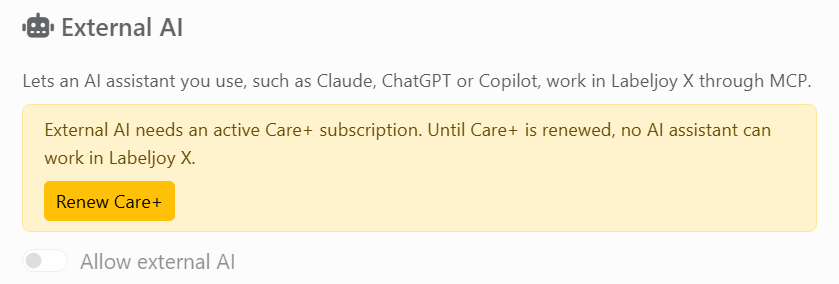
To stop it, turn off Allow external AI. The AI's next action is refused, and it's told to ask you to turn it on again.
What your AI assistant reads of your documents goes to its provider, as everything you ask it does, under your agreement with them. Labeljoy's tools don't hand it the rows of your data - only the names of the fields and how many rows there are - though a picture of a label it asks for shows what's printed on it. Nothing about your license is ever given to it.