
The text editor, at the top of the Text section, is where you type an element's text and format it. What you type shows on the label half a second after you stop.
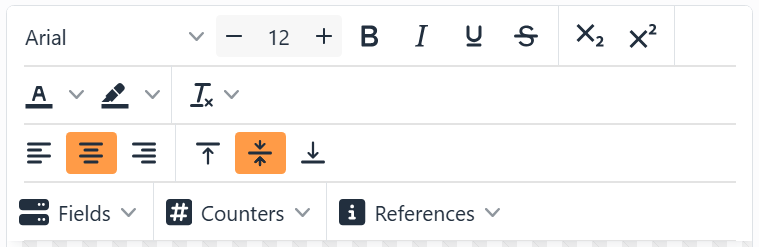
| Formatting | |
| Font | The fonts on your computer, with the ones you used lately at the top. |
| Font size | From 2 to 1024 points. Type it, or use − and +. |
| Bold, Italic, Underline, Strikethrough | As usual. |
| subscript, superscript | Smaller text, lowered or raised - for a chemical formula or a footnote mark. |
| Text Color, Background Color | The color of the selected letters, and a highlight behind them. The arrow opens the color picker; the button itself uses the last color again. |
| Reset format | Clear fonts, Clear effects, Clear colors or Clear all formatting. |
| Align Left, Center, Right; Align top, middle, bottom | Where the text sits in the element, across and down. They apply to the whole text. |
With the cursor at the very start of the text and nothing selected, the font, size, bold, italic, colors and the rest apply to the whole text at once.
| Text that fills itself in | |
| Fields | A column of your data, different on every label. With no data connected yet, the menu has Connect data source, which opens the Data connection wizard. See Fields. |
| Counters | A number or letter that goes up on every label: Decimal, Hexadecimal, Binary, Alphanumeric, Alphabetical or Custom. See Counters. |
| References | Things Labeljoy knows: the page and label numbers, the date and time, the file name, the layout, your user name, and more. See References. |
Fields, counters and references show in the text as placeholders: small
boxes with a dotted border, holding an icon and a name - the field's, or the kind of counter or reference. Click one
to change its settings; rest the mouse on it to see them.  Show placeholder names, at the bottom left of the editor,
turns the names off and on: without them, each placeholder is just its icon over a dotted line. The button is orange
while the names show, and Labeljoy remembers your choice for every editor.
Show placeholder names, at the bottom left of the editor,
turns the names off and on: without them, each placeholder is just its icon over a dotted line. The button is orange
while the names show, and Labeljoy remembers your choice for every editor.
| Also handy | |
| Zoom out, the zoom, Zoom in | At the bottom right: make the text bigger or smaller in the editor, from 50% to 300%. It doesn't change the label. Click the percentage to go back to 100%. |
| Pasting | Text from another program arrives as plain text. Text copied in Labeljoy keeps its formatting, and its fields, counters and references. |
| Ctrl+Z, Ctrl+Y | Undo and redo your typing, while you're in the editor. |
Emoji can't go on a label, so the editor leaves them out - and a text leaves them out of your data too. A barcode keeps them, as data.




























